

Business tools
9 min
Business process mapping: a practical guide
Business process mapping documents how work moves from a trigger to an outcome, including the people responsible, the information exchanged and the decisions along the way. It helps teams find unclear handoffs before changing their CRM, business tools or automations. Start with the current workflow, make exceptions visible, then design and test a simpler process that the people doing the work can use.

Nadir BOUSSETTA
Updated on
What is business process mapping?
Business process mapping is a visual description of how an organization gets a piece of work done. It connects activities, decisions and responsibilities from a defined starting point to an observable result.
A process map can cover customer onboarding, order fulfillment, invoice preparation or a transfer from sales to delivery. IBM’s process mapping overview explains how visualizing a workflow helps teams understand its components and identify opportunities for improvement.
For a service business, the most useful questions often sit between activities:
What tells the next person that work is ready?
Which information must accompany it?
Who accepts or rejects the handoff?
What happens when the normal path cannot continue?
A shared map makes these questions visible. An organization chart shows reporting relationships; a procedure explains how to perform a task. A process map follows the work across those boundaries.
Choose the right level and format
Begin with the level of detail needed for the decision. A company-wide map can show how selling, preparing, delivering and billing relate to management and support processes.
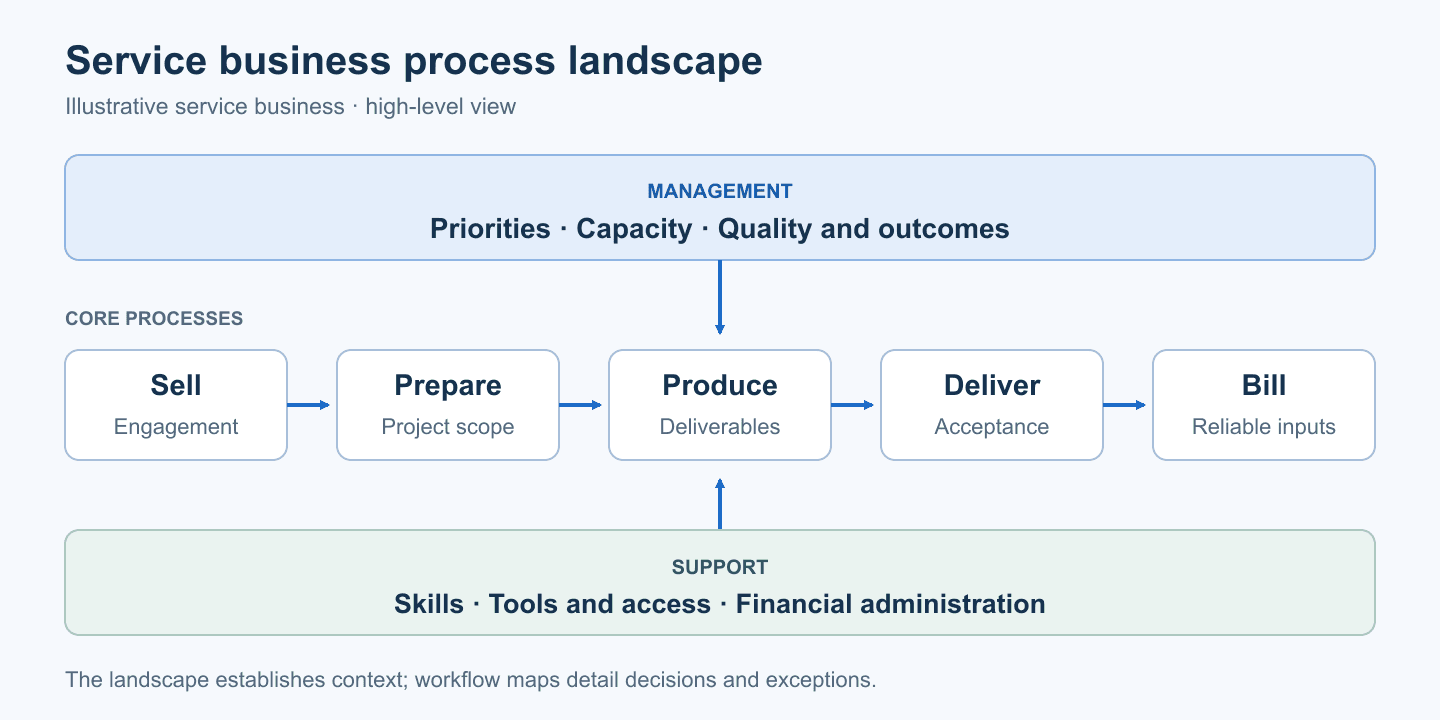
An illustrative overview, to be adapted to the organization. Individual workflows can be mapped separately.
A detailed workflow then zooms in on one outcome, such as turning a confirmed engagement into a project that delivery can start.
Format | Useful question | Best starting point |
|---|---|---|
High-level process map | How do the main processes connect? | Understanding the business as a whole |
SIPOC | Who supplies which inputs, and who receives the output? | Defining the boundaries of a process |
Flowchart | What happens next, under which condition? | A straightforward sequence of work |
Swimlane diagram | Who does the work, and where does ownership change? | Handoffs between teams or organizations |
SIPOC stands for Suppliers, Inputs, Process, Outputs, Customers. ASQ describes it as a high-level way to capture the elements of a process before developing its details.
For a first workflow, use a small set of understandable symbols: rounded shapes for start and end, rectangles for activities, diamonds for decisions, and arrows for sequence. Label decision branches with the condition that selects them.
BPMN, or Business Process Model and Notation, provides a formal notation for business processes. Consider it when precise event or interaction modeling is necessary. A simple diagram made of boxes and arrows should not be presented as a compliant BPMN model by default.
How to map a business process
Define a trigger, an outcome and an owner
Pick a concrete problem, such as repeated requests for missing onboarding information or delays between a sale and a project kickoff.
Write down where the process begins, what must be true at the end, and who is responsible for its overall performance. Define what is outside its boundaries.
For a sales-to-delivery handoff, the trigger might be a confirmed engagement. The outcome could be an accepted project brief, an assigned delivery owner and an agreed start date. Negotiation happens upstream; detailed production happens downstream.
Trace how the work happens today
Walk through recent examples with the people who send and receive the work. Include an awkward case, not only a successful one.
Look at the messages, records and documents used to make decisions. Capture where information is copied, where someone waits, and where the team relies on unwritten knowledge.
Keep observed behavior separate from assumptions. If the team cannot agree who approves a scope exception, mark it as an unresolved decision. Drawing an approval box will not settle it.
Different service types may need different paths. Use a branch when a variation is manageable; use a separate workflow when the responsibilities or outcomes are substantially different.
Make handoffs and decisions explicit
Name activities with verbs: “Review the signed scope,” “Assign a delivery owner,” or “Confirm the kickoff date.” A box labeled “CRM” does not tell someone what to do.
For each handoff, identify the sender, recipient, required information and acceptance condition. Also define how incomplete work returns to the person who can resolve it.
“Sent to delivery” is a transmission event. “Accepted by delivery” is a separate state. Treating them as equivalent can hide work that has been passed along but cannot yet progress.
Design a small, testable improvement
Keep the current-state map separate from the proposed future state. Otherwise, the team loses track of which steps already happen and which ones still need to change.
Look for a specific improvement: remove a duplicate request, clarify an acceptance rule, eliminate an unnecessary approval or establish one reference for an important piece of information.
Change the workflow before automating it. A notification can make a missing brief visible, but it cannot decide what a usable brief contains.
Walk through normal and exception cases
Ask the people involved to follow the proposed map using realistic scenarios. At each step, check who can act, what they need and how they know the step is complete.
Then try the change on a limited part of the work. Use measures connected to the original problem, such as handoff turnaround, requests returned for missing information or repeated data entry.
Avoid treating the map itself as the result. The useful result is a clearer process whose behavior can be observed.
Example: mapping a sales-to-delivery handoff
Consider a fictional B2B agency. Sales marks an engagement as won, but delivery has to reconstruct the promised scope from email and ask the client again for access. This teaching example does not represent a HyperOps client or a measured business outcome.
The process starts when the engagement is confirmed under the company’s rules. It ends when delivery has accepted the information and organized the project launch.

The diagram isolates one exception: missing information. Capacity constraints and scope changes also need an explicit resolution path.
A companion table makes the diagram usable:
Activity | Owner | Required information | Completion condition |
|---|---|---|---|
Prepare the handoff | Sales owner | Confirmed engagement, sold scope, contacts and agreed terms | Handoff package sent to operations |
Review the package | Operations owner | Package and launch dependencies | Accepted, or missing items identified |
Supply missing information | Client, contacted by the designated owner | Missing brief details, access or approval | Updated package available for review |
Plan the launch | Operations owner | Accepted scope, team capacity and availability | Delivery owner and start date confirmed |
Monitor the handoff | Process owner | Sent and accepted dates, reasons for returns | Blocked work visible and addressed |
In this example, a complete package means delivery can understand the agreed work, identify the client contact and access what it needs for preparation. It does not mean every detail of the engagement must be known at signing.
The map should also make three situations actionable:
Missing client access: identify who requests it, where the blocker is tracked and which preparation can continue.
Insufficient delivery capacity: resolve the launch date or staffing before confirming the commitment.
A request beyond the sold scope: route it back for a commercial decision instead of silently adding work.
This example covers one transition. The broader quote-to-cash process connects quoting and engagement to delivery, billing and payment.
Turn the process map into system requirements
Use the map to decide what your systems need to support. In the example, the CRM manages the commercial relationship and engagement information; an operational system manages project preparation and delivery. One platform may cover both when it fits the actual work.
Before building connections, assign a reference source for each important fact:
The sold scope points to the agreement that governs the engagement.
The project keeps its working scope and approved changes.
Client contact details are maintained in the chosen reference system.
Preparation status is owned by the team doing the preparation.
These boundaries shape the CRM system architecture. The process map explains why information must move and which person needs it to act.
An automation could create a preparation record when an engagement is confirmed. Marking the project ready to start without reviewing that record is a different decision and may require human judgment.
Also define what happens when a connection fails. The transfer should be visible, recoverable and safe to retry without creating multiple projects for the same engagement. A diagram arrow identifies an exchange; the implementation still needs to make that exchange dependable.
Keep the map useful as the business changes
Give the map an owner, a version and a review date. Revisit it when responsibilities, tools or decision rules change, and let the people doing the work report differences between the diagram and reality.
Use enough detail to support a decision. Move lengthy task instructions into a procedure, keep the overview readable, and split a workflow when several unrelated outcomes have accumulated in the same diagram.
A useful review asks whether someone can take the next action without guessing. If the answer depends on undocumented knowledge, the map or the underlying process still needs clarification.
Start with one costly handoff. Document how it works, agree on the receiving team’s acceptance condition, and test a change before expanding the effort.
HyperOps helps service businesses structure their processes, data and operational tools around the people using them. Process mapping provides a practical starting point for designing a system the team can adopt.
Frequently asked questions about business process mapping
What is the difference between a process map and a flowchart?
A flowchart is a diagram format for showing sequences and decisions. Process mapping is the broader activity of documenting how work happens. It can use flowcharts, swimlanes or high-level maps depending on what the team needs to understand.
Do we need to map every business process?
A high-level overview can establish context, but detailed work should start with a meaningful problem. Extend the mapping when another workflow or dependency needs to be understood, rather than documenting the whole company at once.
Which software do we need for business process mapping?
Paper, a whiteboard or a basic diagramming tool can be enough to begin. Choose software around collaboration, sharing and maintenance requirements. The important decisions concern ownership, information and acceptance conditions.



Are your tools not running at full capacity?
CRM Implementation
Airtable business tools
Automation & AI
100+ companies supported





Need to go further on this topic?
Explain to us how you operate and the difficulties you are facing. No need for specifications: a few pieces of context are enough to get started.
" width="1200px"/><path d="M 266.535 16.032 C 223.973 8.761 187.735 7.632 157.11 11.498 C 103.429 18.273 67.035 40.432 43.86 71.713 C 20.585 103.127 10.454 143.889 9.417 187.627 C 8.842 211.814 11.054 236.889 15.354 261.795 L 5.904 261.795 C 1.673 236.82 -0.483 211.689 0.092 187.408 C 1.173 141.877 11.842 99.277 36.379 66.156 C 61.017 32.908 99.448 9.382 155.923 2.257 C 187.042 -1.678 223.673 -0.611 266.535 6.589 Z" fill="rgb(255, 255, 255)" height="261.79526125615695px" id="EOQRdtWnD" transform="translate(933.465 538.211)" width="266.5353197890507px"/><path d="M 422.36 47.835 C 396.36 45.858 367.779 40.81 336.21 31.96 C 262.11 11.188 203.266 5.673 157.116 11.496 C 103.429 18.271 67.041 40.43 43.866 71.711 C 20.591 103.123 10.46 143.888 9.423 187.627 C 8.098 243.465 21.585 304.027 41.535 356.315 C 47.185 371.127 51.979 386.052 55.785 400.908 L 46.166 400.908 C 42.554 387.171 38.073 373.377 32.835 359.658 C 12.491 306.327 -1.259 244.502 0.091 187.403 C 1.173 141.871 11.841 99.27 36.379 66.15 C 61.016 32.902 99.448 9.378 155.923 2.251 C 203.26 -3.722 263.341 1.86 338.716 22.987 C 369.379 31.585 397.135 36.461 422.354 38.33 Z" fill="rgb(255, 255, 255)" height="400.9083347098903px" id="CM5yVI9tH" transform="translate(777.641 399.098)" width="422.36004607987206px"/><path d="M 578.177 13.167 C 527.702 52.212 451.402 69.48 336.208 37.189 C 262.108 16.418 203.264 10.902 157.108 16.726 C 103.427 23.5 67.039 45.659 43.858 76.94 C 20.583 108.352 10.458 149.118 9.421 192.856 C 8.096 248.693 21.577 309.256 41.527 361.546 C 62.183 415.693 71.477 471.281 62.121 519.887 C 60.477 528.5 58.189 536.978 55.277 545.249 L 45.364 545.249 C 48.671 536.449 51.221 527.374 52.977 518.137 C 61.983 471.356 52.908 417.524 32.833 364.888 C 12.489 311.561 -1.262 249.738 0.092 192.636 C 1.17 147.106 11.839 104.502 36.383 71.384 C 61.014 38.136 99.446 14.611 155.921 7.484 C 203.258 1.511 263.339 7.092 338.714 28.22 C 454.514 60.682 529.577 41.144 578.177 0 Z" fill="rgb(255, 255, 255)" height="545.2493750000006px" id="quewpegSi" transform="translate(621.824 254.751)" width="578.1767758588476px"/><path d="M 1096.837 0 C 1063.719 98.523 981.369 194.7 779.037 137.981 C 704.944 117.211 646.094 111.695 599.944 117.519 C 546.26 124.293 509.872 146.452 486.695 177.733 C 463.42 209.146 453.289 249.911 452.252 293.649 C 450.928 349.487 464.414 410.049 484.361 462.339 C 505.019 516.489 514.311 572.072 504.956 620.677 C 499.756 647.675 488.835 672.506 470.949 693.756 C 453.107 714.956 428.391 732.525 395.589 745.037 C 329.823 770.125 231.269 774.9 89.979 747.719 C 57.387 741.45 27.484 734.869 0 728.075 L 0 718.544 C 27.914 725.444 58.369 732.156 91.726 738.575 C 231.162 765.412 328.006 760.844 392.248 736.337 C 423.508 724.412 446.977 707.775 463.828 687.756 C 480.636 667.787 490.913 644.4 495.814 618.933 C 504.817 572.149 495.747 518.321 475.667 465.682 C 455.324 412.355 441.575 350.533 442.934 293.429 C 444.012 247.897 454.684 205.296 479.223 172.176 C 503.857 138.928 542.289 115.404 598.764 108.277 C 646.1 102.304 706.181 107.886 781.556 129.013 C 973.65 182.864 1053.675 93.671 1086.656 0.001 L 1096.837 0.001 Z" fill="rgb(255, 255, 255)" height="766.0781015089856px" id="uOoHbsmVz" transform="translate(0.001 0)" width="1096.837499999949px"/><path d="M 821.268 0 C 774.037 19.125 711.137 22.727 627.518 0 L 669.212 0 C 716.174 8.62 755.468 7.761 788.249 0 Z M 374.848 0 C 356.714 10.202 342.212 23.319 330.874 38.619 C 307.6 70.031 297.466 110.8 296.432 154.533 C 295.108 210.371 308.593 270.933 328.541 323.222 C 349.199 377.373 358.491 432.956 349.136 481.563 C 343.936 508.559 333.014 533.391 315.129 554.64 C 297.286 575.84 272.571 593.407 239.769 605.92 C 184.744 626.913 106.758 633.681 0 619.411 L 0 610.027 C 105.685 624.304 182.533 617.787 236.428 597.227 C 267.688 585.301 291.157 568.66 308.008 548.64 C 324.816 528.673 335.093 505.283 339.993 479.818 C 348.998 433.033 339.926 379.206 319.846 326.568 C 299.504 273.241 285.754 211.417 287.108 154.316 C 288.186 108.786 298.859 66.182 323.397 33.064 C 332.843 20.282 344.299 9.116 357.319 0 Z" fill="rgb(255, 255, 255)" height="626.9607820564861px" id="lc1D1RSUL" transform="translate(0.001 0)" width="821.2681884765623px"/><path d="M 141.374 0 C 140.986 5.133 140.732 10.274 140.612 15.42 C 139.29 71.259 152.774 131.82 172.722 184.111 C 193.379 238.26 202.671 293.844 193.316 342.449 C 188.116 369.446 177.196 394.278 159.309 415.527 C 141.467 436.727 116.751 454.293 83.95 466.807 C 60.35 475.812 32.514 482.201 0 485.435 L 0 476.095 C 31.217 472.917 57.944 466.761 80.608 458.112 C 111.867 446.187 135.334 429.544 152.19 409.526 C 168.996 389.558 179.274 366.167 184.175 340.701 C 193.177 293.919 184.107 240.091 164.027 187.452 C 143.684 134.133 129.935 72.301 131.288 15.2 C 131.406 10.128 131.65 5.06 132.021 0 Z" fill="rgb(255, 255, 255)" height="485.4349999999995px" id="ryUOsw6P8" transform="translate(0 0)" width="196.9605581159212px"/></g></g></svg>)